Edit private data safely
Use the private-sync workflow for authoritative namespace changes. It preserves complete documents, validates before remote access, detects conflicts, and suppresses unchanged writes.
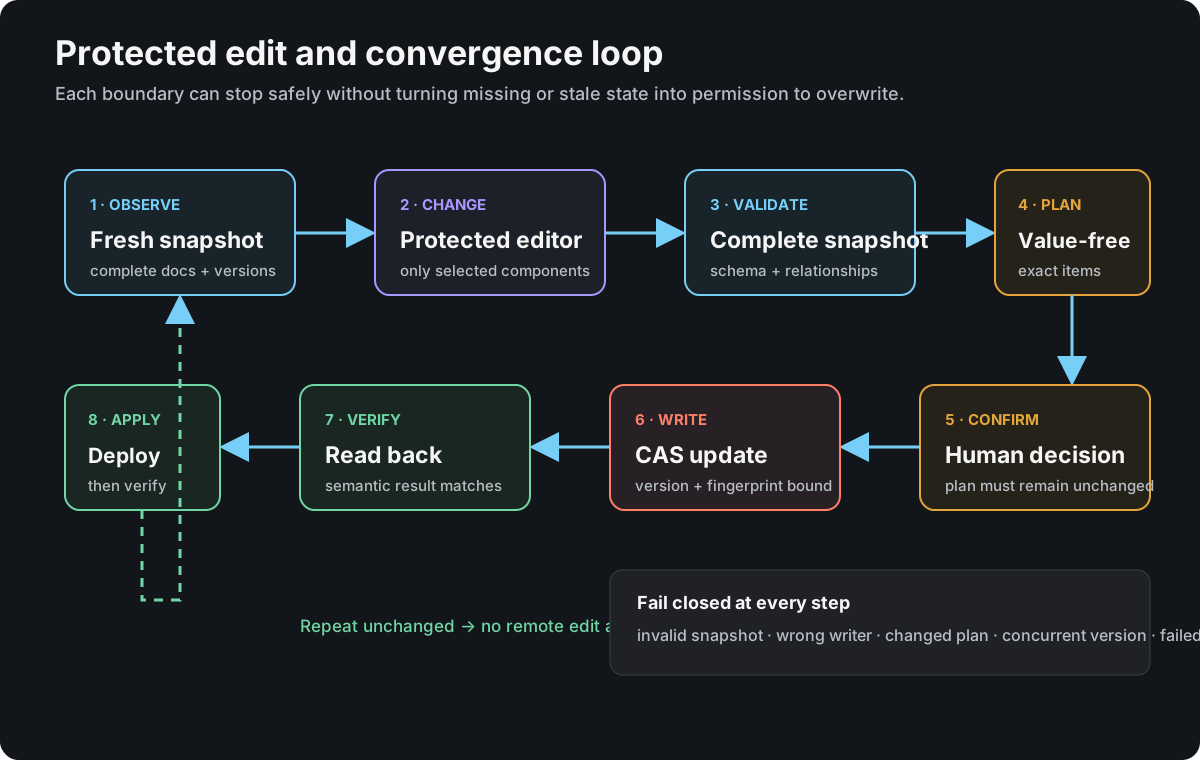
Open the protected edit loop full size
Preferred attended workflow
All namespace data is Config, including sensitive fields and deployed service
settings. Launch ./enclavr and choose Config → Browse config to read it
without creating local files or opening a writer connection. Values marked
sensitive remain concealed. Press Enter to open groups and read-only fields.
To export a component, return to the component list, select it and press e.
Enter an absolute destination path, review the plan and press y to write a
0600 file in a protected directory. The export includes that component's
sensitive values. An unchanged export is a no-op. Enter alone never confirms
the write. Export is also available from the editable config component list.
Config → Roles and cluster status uses separate Summary, Roles, DNS publication and Cluster tables. Tab switches tables; Enter opens the selected row's full connection paths, policy and observation notes. Arrow and Page keys scroll, and Escape returns to the table. No credentials are opened by status.
For the TUI, launch ./enclavr, then choose Config → Repair namespace for runtime
settings and personal details, or Config → Edit config for all private
components. Field forms stay in memory. Informational item notes are read-only.
For a complete document, select it in Config → Edit config and press v.
Review the editor plan and press y: Vim takes over the same terminal, and
exiting it returns directly to Enclavr. Enter on a raw Caddy document opens
this workflow too. JSON documents retain their individual field forms as well
as the whole-document option. This explicitly requested Vim workflow is the
exception to the normal forms-only interaction.
Vim receives the complete document, including documents beyond 12,000 lines.
Use /text to search, n for the next match, :12000 to jump to a line, G
for the end, and i to insert text. Press Escape, then :wq to return the
edited draft or :cq to discard this editor attempt. Existing sensitive values
are visible inside this explicitly selected editor; normal forms remain concealed.
Enclavr owns a temporary 0600 draft under a private 0700 directory in the
ignored priv/ tree. Vim swap, backup, persistent undo, viminfo, modelines and
plugins are disabled. A successful return imports the validated document into
memory and deletes the temporary directory. If validation fails, press v to
correct the retained draft or d to discard it; closing the form cleans it up.
An abruptly killed process can leave a protected draft under priv/tui-document-*.
No editor output or document content is recorded in Enclavr session logs.
Saving in Vim does not publish to OpenBao. Back in the component list,
press r to review and then y to publish. The existing version/fingerprint
conflict checks and read-back verification still apply. An unchanged document
produces no remote write. Caddy activation still requires its separate
preparation, publication and deployment workflow.
In particular, a note beginning “Enclave secrets. No placeholder credentials…” does not request a credential. Open the secrets fields group and edit the named settings:
| Field | What to enter |
|---|---|
configr_src_ref |
The configuration repository's Git clone URL, without a token embedded in it. |
configr_op_hostlist_json_object_ref |
Exactly op://<namespace>/assets.<namespace>/document. |
configr_users |
Managed-user entries containing the Unix configr_username and configr_object_ref pointing to op://<namespace>/users.<namespace>/document; the form opens these as individual fields. |
configr_op_repo_read_key |
A real read-only repository token issued by the Git hosting service. Input is concealed; an empty replacement preserves the existing token. |
Other service fields must use the exact names referenced by the authoritative configuration. Enter credentials issued for those services, only when needed. The users group contains the Unix username, Git author name/email, SSH public signing key and authorized SSH public keys. Private keys do not belong there. OpenBao runtime does not need a 1Password service-account token.
Use Enter to open a field or group, Ctrl+S to apply a field to the draft, and
r to review the changes. Long guidance and errors scroll with PgUp/PgDn.
Only y at the reviewed publication plan confirms a remote write. Escape goes
back; leaving the form asks whether to discard the draft. Ctrl+C cancels and
cleans up. Unchanged forms produce no remote writes.
For the explicit CLI editor workflow:
Run on the current assets.namespace_writer_host:
./enclavr priv edit --namespace <namespace>
To limit the editor to selected document classes, repeat --component:
./enclavr priv edit --namespace <namespace> --component assets
./enclavr priv edit --namespace <namespace> --component caddy-mask
Supported selectors are assets, users, secrets, aws-vpc-bastion, caddy-mask, forgejo, malcolm, and tailnet.
The command:
- opens the normal provider and reads a fresh complete snapshot;
- verifies the separately accepted writer pins the same namespace and cluster;
- checks exact update capability for the selected documents;
- creates an isolated
0700session with0600component files; - opens only pushable files in
$EDITOR(vimby default); - detects byte changes and validates the complete snapshot;
- displays an exact, value-free plan;
- asks for confirmation—
priv editintentionally has no upfront--yes; - applies version- and fingerprint-bound updates;
- reads back and verifies the result, then removes a successful or unchanged session.
If editing or validation fails, or confirmation is declined, Enclavr reports and retains the protected session for recovery.
The standalone priv pull, priv check and priv push commands have been
retired. Use the attended TUI editing workflow or the CLI priv edit command;
both retain shared validation, conflict detection and verified publication.
Existing operator-owned priv/pull and priv/push directories are not deleted
or imported automatically.
The ignored priv/ tree is credential-bearing even though it is outside Git. CLI editor component suffixes are:
| Suffix | Meaning |
|---|---|
.document |
Plain-text document component |
.document.json |
JSON document component |
.fields.json |
Custom fields selected for patching |
.item.json |
Raw pulled backup; never pushed |
Writer ownership
namespace_writer_host must identify exactly one declared host. If no writer has been established, the host already holding the accepted writer connection may run attended priv edit --component assets to propose itself, validate membership, and put the designation through the same editor and confirmation path.
To move the writer, follow Move the namespace writer for destination checks, coordinated custody and assets changes, verification, retirement and rollback. Copying a connection file and changing namespace_writer_host independently can leave two authorities or no verified authority.
Conflict and no-op behavior
- A changed remote item ID, version, or full fingerprint stops before write.
- A local component identical to the live item produces no remote edit.
- Unselected fields, metadata, field order, and documents remain intact.
- Assets are written as complete validated source, never reconstructed from a partial host projection.
- A failed remote lookup is an error, not proof that an item should be created.
Assets, secrets and users updates do not invalidate an unchanged Caddy publication. After changing a Caddyfile, its recorded body hash becomes stale. Finish the intended Caddy edit, then follow Caddy preparation and publication for each affected existing document before the relevant deployment. Verify the real consumer path after deployment.