Command map
enclavr is the canonical entrypoint. The CLI and interactive cockpit share the same action catalog and application services.
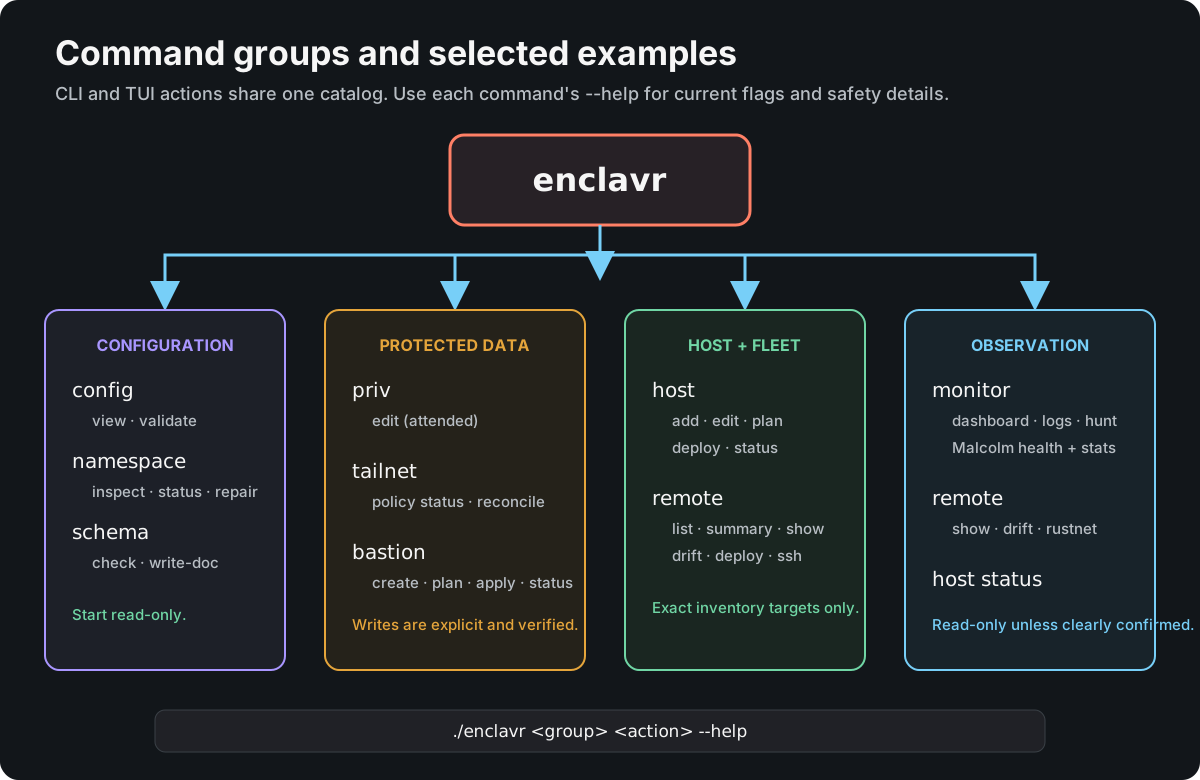
Open the command map full size
Start with help
./enclavr <group> --help
./enclavr <group> <action> --help
Built-in help is authoritative for flags, confirmation, prerequisites, reads, writes, and follow-up actions. Help requests do not load namespace credentials or refresh managed Bash profiles. Run ./enclavr with no arguments for the Bubble Tea cockpit.
Managed Bash completion uses the current Go action catalog for both enclavr
and ./enclavr, including nested commands, command-specific flags, --component
selectors and file paths. It offers --yes only for commands that accept it.
Hostname arguments work after options and for every remote rustnet-panes target.
Retired priv pull, priv check and priv push commands are not candidates.
Completion queries the current executable each time; it does not cache command
paths, open OpenBao, query Tailscale or write session logs. Hostnames come from
the session's existing hostname list and still require inventory validation.
After pulling the change, run ./enclavr internal bash-profile-refresh, then
source ~/.bash_profile_enclavr.io in each existing Bash session. File and
directory completion is limited to path arguments. Namespace names and --only
action IDs are entered explicitly; use host plan to find applicable action IDs.
Pass flag values as separate arguments, for example --only caddy-mask-proxy.deploy.
Core groups
| Group | Purpose | Typical safety class |
|---|---|---|
config |
Browse configuration or validate the namespace, schema, and current host | Read; optional confirmed local export in the TUI |
namespace |
Inspect ownership, manage access and the private web endpoint, repair fields, and reconcile runner registrations | Read or guarded write |
priv |
Edit protected components through the attended workflow | Guarded remote write |
host |
Add/edit inventory, plan, deploy, and inspect the current host | Read or confirmed write |
schema |
Check the embedded assets contract and generated reference | Read or confirmed local write |
monitor |
Show dashboards, logs, hunts, and Malcolm health/statistics | Read-only |
tailnet |
Compare or reconcile the namespace HuJSON policy | Read or confirmed remote write |
remote |
Inspect or operate explicitly selected inventory hosts | Read or confirmed host write |
bastion |
Plan, apply, and inspect declared AWS bastions | Read or confirmed billable write |
Public commands
Every public command is listed below. Append --help for its accepted flags,
inputs and confirmation rules. Guided commands open forms and obtain their own
confirmation; supplying arguments still makes the invocation a CLI command.
DNS publication remains a documented internal operation. Caddy preparation and
publication are public namespace commands and appear in the TUI Config menu.
| Command | Purpose |
|---|---|
enclavr config view |
List accessible configuration components; use the TUI for browsing and export |
enclavr config validate |
Validate assets and the selected host contract |
enclavr namespace inspect |
Inspect canonical documents without exposing values |
enclavr namespace status |
Discover writer, service-role ownership and live cluster leadership |
enclavr namespace caddy prepare |
Review and save a protected snapshot of an existing Caddy document through a form |
enclavr namespace caddy publish |
Review and publish that snapshot through the existing writer; unchanged content is a no-op |
enclavr namespace repair |
Repair secrets and users through forms |
enclavr namespace access |
Manage declared role permissions through attended forms |
enclavr namespace ca |
Inspect or export the existing public CA certificate |
enclavr namespace web |
Start the isolated private web endpoint for up to four hours |
enclavr namespace admin acquire |
Obtain temporary attended administrator access |
enclavr namespace admin end |
End the current interactive session's administrator access |
enclavr namespace runners status |
Inspect declared Forgejo runner registrations |
enclavr namespace runners reconcile |
Reconcile explicitly missing runner registrations |
enclavr priv edit |
Edit, validate, review and publish selected protected components |
enclavr host add |
Add a host through schema-driven forms |
enclavr host edit |
Edit an existing host through schema-driven forms |
enclavr host issue-identity |
Issue an approved dedicated host identity through attended forms |
enclavr host enroll |
Accept this host's dedicated connection |
enclavr host plan |
Preview the ordered deployment actions |
enclavr host deploy |
Deploy the exact current hostname |
enclavr host status |
Inspect local managed component state |
enclavr host objects status |
Inspect the exact local encrypted object volume and authenticated S3 readiness |
enclavr host objects test |
Confirm and run scoped S3 integrity, multipart and denied-access checks |
enclavr host repos-sync |
Synchronize accessible repositories and eligible existing core deployments |
enclavr host repos-schedule |
Schedule daily repository synchronization |
enclavr schema check |
Check schema, QA assets and generated schema documentation |
enclavr schema write-doc |
Update the generated schema reference |
enclavr monitor dashboard |
Open the live monitoring dashboard |
enclavr monitor logs |
Read a bounded, redacted systemd or Docker log snapshot |
enclavr monitor hunt |
Inspect host state and repository drift |
enclavr monitor malcolm-statistics |
Report historical utilisation and conditional storage forecasts |
enclavr monitor malcolm-health |
Check current Malcolm health |
enclavr tailnet policy status |
Compare protected and live tailnet policies |
enclavr tailnet policy reconcile |
Reconcile policy with ETag and semantic verification |
enclavr remote list |
List inventory hosts |
enclavr remote summary |
Summarize inventory capabilities |
enclavr remote show |
Show one configured host |
enclavr remote enroll |
Deliver an approved checkout and dedicated connection over SSH |
enclavr remote deploy |
Deploy one remote host |
enclavr remote deploy-all |
Deploy eligible hosts with explicit exclusions |
enclavr remote drift |
Inspect one host through its installed Enclavr command |
enclavr remote ssh |
Open SSH to one validated host |
enclavr remote rustnet |
Open Rustnet on one validated host |
enclavr remote rustnet-panes |
Open a tmux pane for each selected host |
enclavr remote rustnet-install |
Run the selected host's Rustnet deployment action |
enclavr remote repos-sync-all |
Synchronize repositories across configured members |
enclavr remote repos-schedule-all |
Schedule repository synchronization across members |
enclavr bastion create |
Guide creation from explicit AWS selections |
enclavr bastion plan |
Plan a declared AWS bastion |
enclavr bastion apply |
Reconcile a declared AWS bastion |
enclavr bastion status |
Inspect declared bastion infrastructure |
Common workflows
Validate and deploy this exact host:
./enclavr config validate
./enclavr host plan
./enclavr host deploy --yes
./enclavr host status
Inspect and safely edit namespace assets:
./enclavr namespace inspect --namespace <namespace>
./enclavr namespace status --namespace <namespace>
./enclavr priv edit --namespace <namespace> --component assets
./enclavr namespace inspect --namespace <namespace>
Inspect the fleet without mutation:
./enclavr remote list
./enclavr remote summary
./enclavr remote show <hostname>
./enclavr remote drift <hostname>
Compare tailnet policy before a separately confirmed reconciliation:
./enclavr tailnet policy status
./enclavr tailnet policy reconcile --yes
Clone missing Forgejo repositories and sync existing checkouts locally: launch
./enclavr, select Operations → Sync Repositories, then choose All
repositories or an organization / owner. Review the plan and press y to run.
The picker lists owners and counts from repositories visible to the existing
persisted reader, including private, archived and template repositories.
Equivalent CLI commands (omit --yes to review a plan):
./enclavr host repos-sync --yes
./enclavr host repos-sync --org OrganisationServiceManagement --yes
./enclavr host repos-sync --org OrganisationServiceManagement --sync-only --yes
remote repos-sync-all also accepts --org OWNER; its TUI picker is under
Operations → Sync All Repositories. Daily schedules continue to sync all
accessible repositories. Checkouts remain under
~/forgejo.<namespace>/<exact-owner>/<exact-repository>. Dirty, detached,
unpublished and divergent work is preserved; core follows main and deploys
only through a pre-existing managed installation. --sync-only disables that
deployment. New clones use the validated Forgejo SSH URL; existing checkouts
use their validated origin and configured authentication. Sync preserves Git
configuration, signing and upstream settings.
Repositories owned by extgatr.enclavr.io are skipped when Forgejo reports a
size above 1 GB (1,000,000,000 bytes). Forgejo reports integer KiB; the
limit applies to that reported size. An unavailable size for this owner also
causes a reported skip. Other owners have no size limit. This policy applies
before cloning or fetching in all-repository, organization, fleet and scheduled
syncs. Existing excluded checkouts and their local work are retained. The TUI
shows eligible and skipped counts before confirmation.
HTTP 401 means Forgejo rejected the persisted reader; its existing owner must
correct secrets.<namespace>/configr_op_repo_read_key through the protected
Config → Edit config workflow. HTTP 403 identifies denied access: verify the
existing approved read:repository scope and intended repository visibility.
Sync does not create credentials or expand permissions, and cannot discover
private repositories hidden from that reader. The token is used for API
discovery only; Git retains the account's existing SSH or HTTPS authentication.
Confirmation rules
Read-only commands do not need --yes. Mutating direct commands require explicit confirmation or an attended workflow. A dry plan never implies remote preflight or approval. priv edit, host forms, and certain administrator ceremonies own their confirmation internally and should not be bypassed.
For the TUI, launch ./enclavr, then select Config → Repair namespace, Config → Edit config, or Config → Add host config / Edit host config. Field forms stay in memory. In Edit config, press v on a document, then y at the editor plan to open the complete document in Vim in the same terminal. :wq returns the draft; :cq discards the editor attempt. Enclavr owns the protected temporary draft and validates it when Vim exits; saving in Vim does not publish. Back in the component list, press r to review, then y to publish. Config → Browse config opens read-only fields; select a component and press e to request a protected file export, then review and explicitly confirm. The CLI priv edit command remains available. Standalone priv pull, priv check and priv push commands have been retired.
The internal group contains repository automation and attended OpenBao administration surfaces. It is not a shortcut around public validation or confirmation contracts; use it only with the repository runbook for the named operation.
For internal openbao-ops, use the OpenBao operations runbook for protected request examples, initialization, identity recovery, backup, leadership and quorum procedures. Isolated snapshot restore uses native OpenBao commands; there is no Enclavr restore operation.